










Coming Soon is a great tool for getting a listing in front of buyers before it's ready for showings. It lets you build some buzz and give your seller a head start — without putting the property fully on the market yet. But a few small entry mistakes can quietly cost you visibility, so here's what to know before you hit save. Getting the status right at entry isn't just a formality — it decides whether your listing gets the exposure it's supposed to.
Does Coming Soon Actually Get Seen?
It does! Coming Soon listings are sent out to public sites through IDX, Syndication, and VOW.
What Coming Soon doesn't allow is showings. It's right in the title: Coming Soon - No Showings.
Broker previews, private showings, and open houses aren't permitted — the property simply isn't ready to be shown yet, in any form. Since you aren't showing the home, the Days on Market (DOM) don't accrue — that clock only starts once the listing switches over to Active.
How Do I Market a Coming Soon Listing?
Public marketing is allowed the whole time a listing is in Coming Soon status — just make sure it's labeled "Coming Soon" everywhere it appears, including a "Coming Soon" rider on any yard sign.
Just remember, if you skip the 'Coming Soon' labeling on your marketing or sign or hold a showing, broker tour, or open house early, you disqualify the listing from Coming Soon status altogether — which can result in a compliance violation.
So think of Coming Soon like "On your marks - get set..." and Active as "Go!". Buyers and brokers may be able to see it's on the way; they just can't schedule a showing or broker preview, and you can't host an open house until it's Active.
One Photo Gets You Started
While your listing is in Coming Soon status, you only need one photo of the property - preferably of the front exterior. You don't need your full gallery ready on day one — just enough to get the listing live while the rest of your marketing comes together.
Three Things to Double-Check Every Time
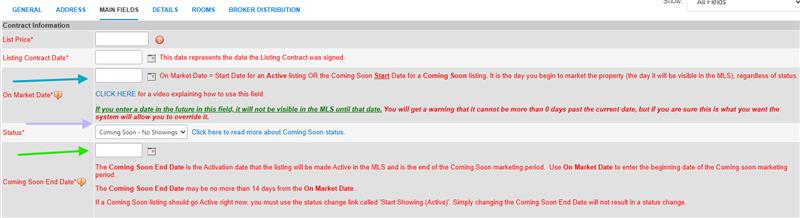
- The One Market Date (Blue Arrow)This is the date your listing becomes searchable in the SWMLS — your Coming Soon marketing start date.
- The Status Selector (Purple Arrow) Make sure the status is set to Coming Soon, not Active — this is the easiest field to get wrong, and the consequences don't show up until later. Once a listing enters Active status, it cannot move back to Coming Soon status unless it has been Cancelled or Expired for at least 30 days. If your listing becomes Active by accident, you'll have to Withdraw it until it's ready for showings.
- The Coming Soon End Date (Green Arrow) This is when your listing automatically switches from Coming Soon to Active in the SWMLS. Coming Soon listings can stay in that status for up to 14 days — if you haven't updated the listing by then, it automatically converts to Active on day 15, showings open up, and the DOM clock starts. Need it to go active sooner? You can manually switch the status any time before the End Date instead of waiting.
Quick Checklist Before You Submit
- Upload at least one photo
- Set status to Coming Soon — No Showings (not Active)
- Confirm the On Market Date (when it becomes searchable as Coming Soon)
- Confirm the Coming Soon End Date (the date it auto-converts to Active - maximum 14 days)
- No showings, broker previews, or open houses while in Coming Soon status
- Label all public marketing "Coming Soon," including a rider on yard signs
- Enter the listing into the MLS within one business day of any public promotion
- If the listing was previously Expired or Cancelled, confirm it's been at least 30 days before re-entering as Coming Soon
- Double-check the status field before submitting
How Coming Soon Compares to Your Other Options
Coming Soon is one of four listing options SWMLS offers sellers, each built for a different level of exposure:
| Status | Showings | Sent to Public Sites | Public Marketing | Time Left |
|---|---|---|---|---|
| Active | Yes | Right Away | Allowed | None |
| Coming Soon | No | At Broker's discretion, labeled "Coming Soon" | Allowed | 14 Days |
| Delayed IDS/ Syndication | Yes | Only after switching to Active | Allowed | None |
| Office Exclusive | Yes | No | Not Allowed | None |
Want to Learn More?
- Southwest MLS Guide to Listing Syndication — GAAR Blog
- Multiple Listing Options BROKER KIT: PowerPoint and Handouts to Share with Your Office — GAAR Blog
- SWMLS Multiple Listing Options Reference (PDF)
Getting these fields right the first time keeps your listing on schedule and working as hard as it can — from the moment it's searchable to the moment it goes fully active.

Comments